
This is the place where you setup all the costing for your print product.
Accessing Your Dashboard
Go to https://admin-v3.pricecal.co/
Enter the credentials that you received from your “welcome email” to access.
⚠️ Important: This dashboard is not optimized for mobile screens. Best to use a desktop screen.
Dashboard Overview
After you login, you’ll see 4 main areas:
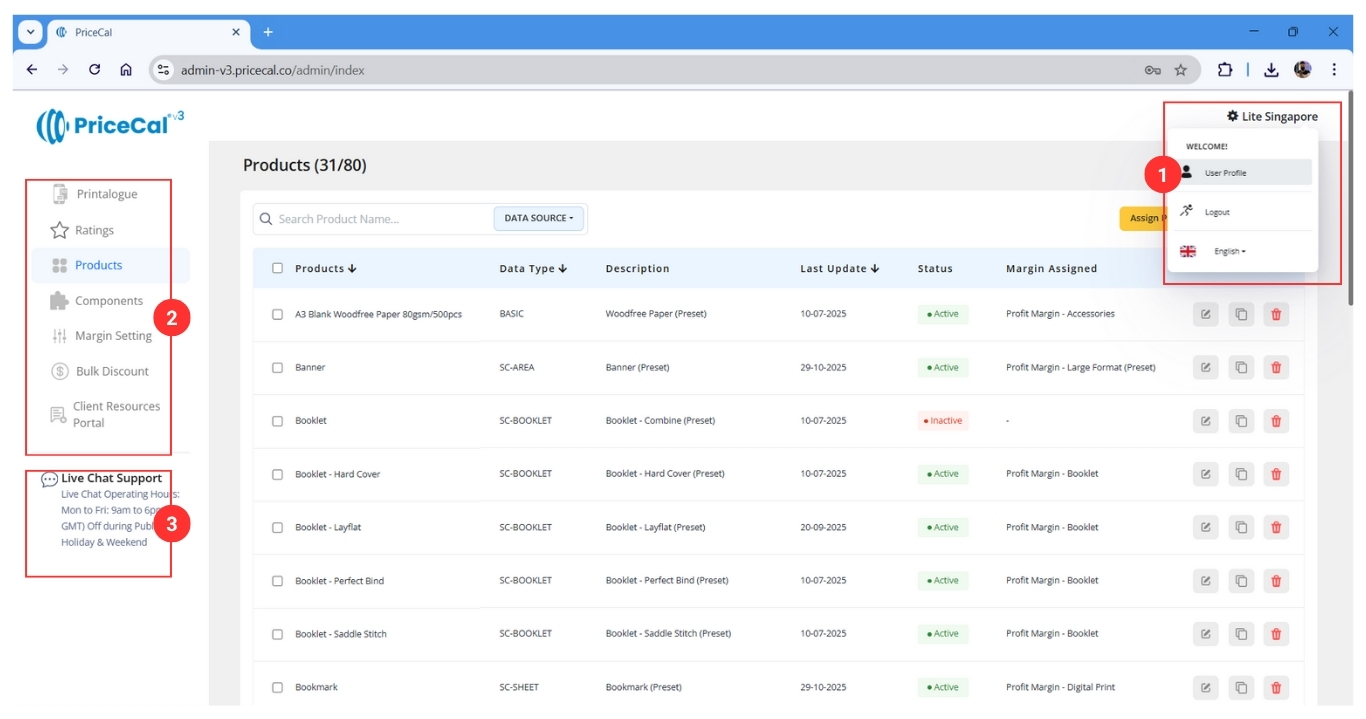
(1) Your Profile and Language Selector Access your account settings and switch between languages
(2) The Main Navigation Menu
- Printalogue – Customize your storefront
- Ratings – Manage customer reviews
- Products – Create and manage print products
- Components – Set up materials, sizes, costs
- Margin Setting – Configure profit margins
- Bulk Discount – Set quantity-based discounts
- Client Resources Portal – Access support materials
(3) Live Chat for Support Get instant help from our support team
(4) Content Area This is where all the action happens – your main workspace for creating and managing everything
Next: Learn about the Customer Journey to understand how your customers will interact with your Printalogue.