
How Product Pricing Works in PriceCal?
Product pricing in PriceCal is calculated by stacking up different components and presenting them as choices for customers to select through the calculator.
💡Think of it like building blocks:
- Each component (material, size, print type, etc.) has its own cost
- You stack these components together
- The calculator adds them up based on customer selections
- Customer gets an instant, accurate quote
🤗 Don’t worry—it’s easier than it sounds! Once you understand the logic, creating products becomes quick and straightforward.
Understanding the Product Create Page
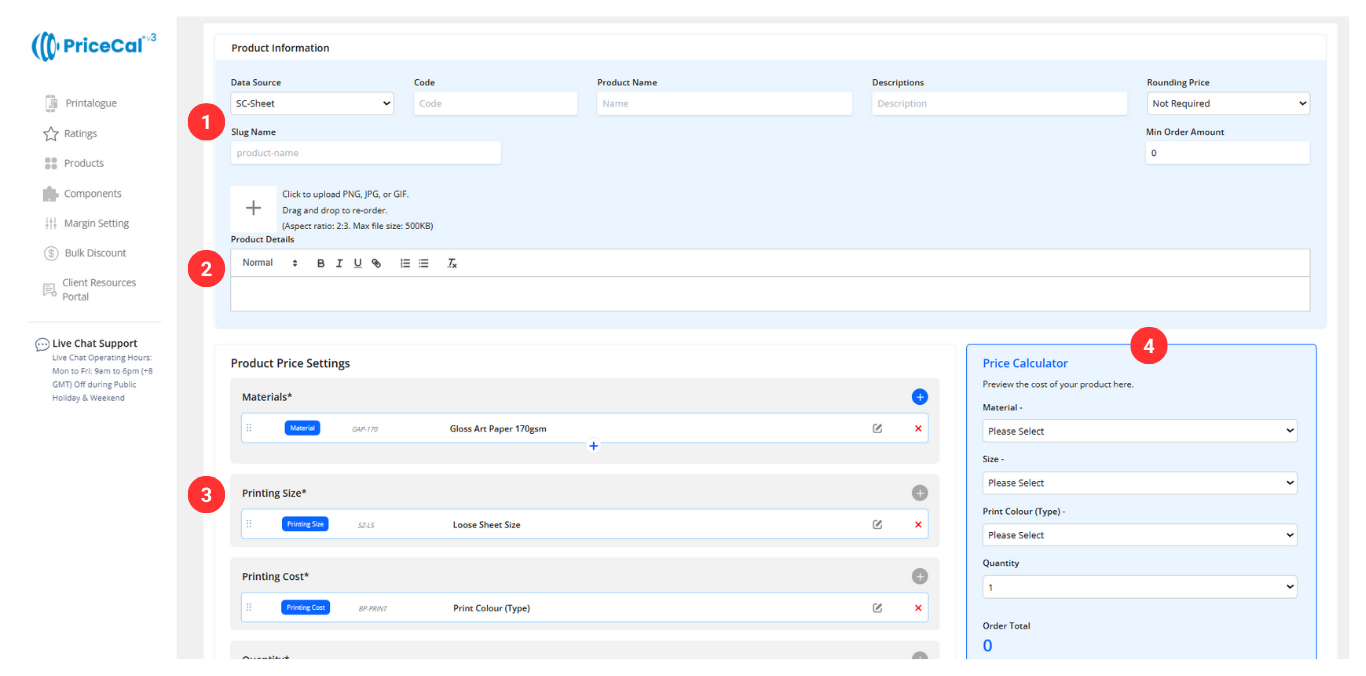
The product creation page has 4 main areas:
- Data Source & Product Details – Where you select your calculation method and enter basic product information
- Product Descriptions and Photos – Add product descriptions, specifications, and display images for customers
- Price Setting Area – Click and stack components to build your pricing formula
- Price Calculator Preview – See real-time calculations as you configure your product
Let’s Create Your First Product
In the following sections, we’ll guide you through creating products using each data source. Each method is designed for specific product types, so choosing the right one ensures accurate pricing and a smooth customer experience.
-
SC-Area – Calculates print prices based on area, such as banners and posters
-
SC-Basic – The most basic product type, representing a single, standalone item with no variations.
-
SC-Booklet – Generates pricing for multi-page products like booklets and catalogs
-
SC-Box – Calculates prices for custom packaging boxes based on opening size, such as windowed boxes or specially designed boxes.
-
SC-Item – Creates pricing for item based products, including mugs and apparel
-
SC-Packaging – Handles pricing for packaging, including boxes and cartons
-
SC-Sheet – Calculates prices for sheet based prints like business cards, stickers, and flyers
-
CSV – Supports table – based pricing for custom configuration
-
API – Connects to printers offering pricing through API for seamless integration
😉 No technical skills required—just follow the steps and you’ll have your first product live in no time!
Next: Learn about each data source and when to use them